


Trails Offroad: Offline Maps
4.6154.00 Reviews
App Specs
- Version
- 4.1.1
- Updated On
- License
- Free
- Downloads
- 50,000+
- Developer
- Trails Offroad
- Categories
- Maps & Navigation
- Platform
- Android
Screenshots
 Analysis by AppCompare
I judge an off-road navigation app less by the excitement of opening it on day one than by whether I still reach for it when planning an ordinary weekend drive. Trails Offroad: Offline Maps is aimed at people who want trail-specific guidance, not just a line on a general road map. Its strongest case is preparation: choosing a route before cell service disappears and having useful trail context available when it does.
What the first week gets right
The appeal is immediate if you already have a destination in mind. Instead of starting with a blank map and trying to guess which dirt roads are worthwhile, I can browse trail options, compare their descriptions, and decide whether a route fits my experience and available time. The app is a Maps & Navigation product from Trails Offroad, and its focus on off-road and overland routes gives it a narrower purpose than a general-purpose navigation app.
That focus matters most before a trip. I would use the app at home or while connected to reliable service to inspect a route, read its trail notes, and save the material I expect to need. The practical tip is to prepare for the whole outing rather than download only the first trail: access roads, nearby alternatives, and a possible exit route can matter just as much when plans change. Offline access is valuable only when the relevant information has been prepared in advance.
A realistic use is a Saturday drive where the pavement ends well before the trail does. I can check the route and its difficulty beforehand, then consult the saved guidance when reception drops. That is a more useful role than expecting the app to rescue a trip I planned casually at the trailhead. I would also keep a separate backup plan for navigation and tell someone where I intend to go; a phone app should support sensible outdoor preparation, not replace it.
Discovering the Great Outdoors
First things first, Trails Offroad: Offline Maps is all about giving you the tools to explore nature without any hiccups. Whether you're a seasoned off-roader or just getting started, this app offers a wide array of trails to suit every skill level. The interface is slick and intuitive, making it easy to navigate through thousands of trail options. Just imagine having a treasure map right in your pocket!
Features That Stand Out
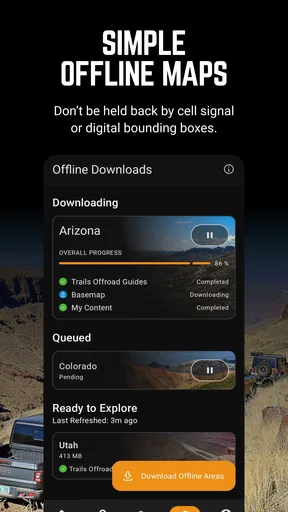
One of the coolest things about this app is its offline capability. We’ve all been there—stuck in the middle of nowhere with no signal. But fear not! With Trails Offroad, you can download maps ahead of time and access them without any Internet. It’s like carrying a reliable guide with you, minus the chatter.
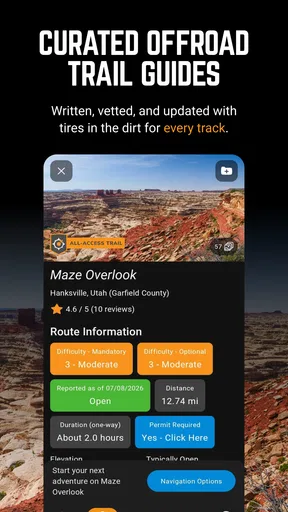
Another feature worth mentioning is the detailed trail descriptions. The app provides in-depth information about each trail, including difficulty ratings, length, and even user-generated reviews. This means you can plan your adventure according to your comfort level and the time you have available. Plus, the photos give you a sneak peek of what to expect.
Worth Reading Before You Choose

EA SPORTS FC Mobile 26 Is a Bigger Football Game, but It Takes Time

Flipboard Shows What News Apps Must Do Beyond the Feed

Switching to Android Auto Means Rethinking Your Driving Routine

Google Calendar Makes a Crowded Week Easier to Manage

Ludo King Makes the Most of the Minutes Between Plans

Baby Panda World Brings Quick Play to Modern Phones, but Its Game Library Feels Busy
These descriptions are also a useful way to spot mismatches between a route and the group you are taking. A difficulty label is a planning aid, not a promise that every obstacle will feel manageable in every vehicle or under every condition. I would read the description alongside the photos and recent feedback, then be willing to turn around if the terrain or conditions differ from what I expected. That small change in attitude makes trail information more valuable than simply treating a rating as a green light.
For someone who asks whether offline access means the whole trip can be handled without service, my answer is to distinguish saved trail material from live information. The offline function is helpful precisely because remote coverage can be unreliable, but it is still wise to prepare while connected and not assume that every change, update, or community contribution will be available in the field. I would check what I have saved before leaving, rather than discover a gap after the signal is gone.
Community and Navigation
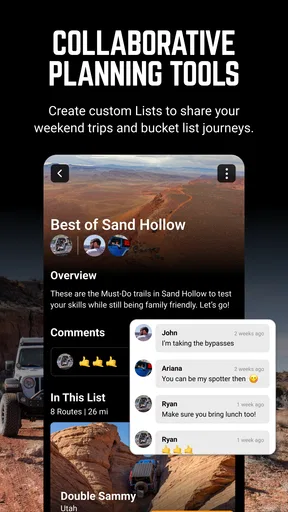
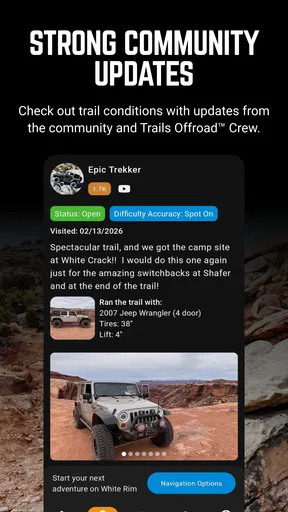
Now, let me tell you about the community aspect. The app facilitates a vibrant community where fellow off-roaders can share their experiences and tips. It’s always reassuring to know you’re not alone out there, and having a community to fall back on can make the journey even more enjoyable.
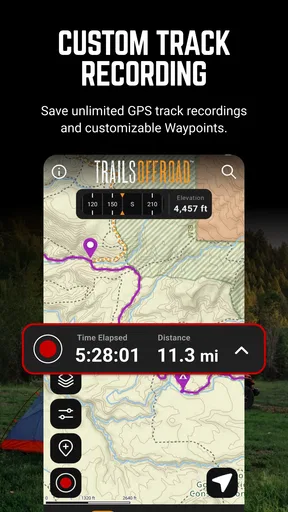
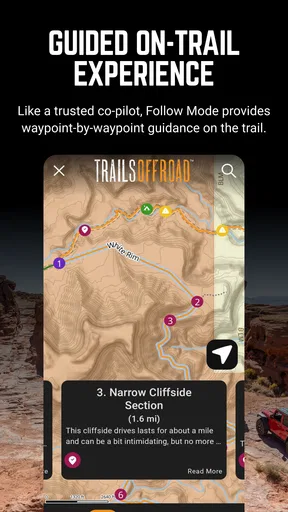
As for navigation, Trails Offroad shines with its GPS tracking feature. It’s super handy, especially if you're prone to taking wrong turns (guilty as charged!). Real-time tracking ensures you stay on the right path, and if you do take a detour, rerouting is a breeze. It’s like having a co-pilot who doesn’t complain about your music choices.
I would treat community notes as useful perspective rather than an authority on current trail conditions. A report can help me anticipate what other drivers encountered, but conditions may change, and a past trip cannot guarantee that a route is passable today. One non-obvious habit that helps is to read comments for the kind of detail that affects my own decision—where someone turned around, what surprised them, or how much time the route demanded—instead of relying only on a broad thumbs-up or down.
Compared with ordinary map apps, the difference is the trail context: general navigation is usually better for getting to a town, finding paved roads, and handling familiar daily journeys, while a dedicated trail guide is more relevant for deciding what an off-road route involves. I would happily use both. A road app can get me to the region; this one can help me assess the trail itself. Neither should be mistaken for a substitute for local judgment, a paper backup, or vehicle-appropriate preparation.
Getting Started
Setting up the app is a breeze. Once you install it, you’ll be prompted to create an account, which is quick and easy. The free version offers a decent amount of features, but if you’re serious about off-roading, the premium subscription unlocks even more trails and advanced features. It’s worth considering if you plan on making this a regular hobby.
The app’s design is user-friendly, with a clean layout that doesn’t distract from the main purpose—getting you out there and exploring. I found myself easily flipping through trails, reading reviews, and planning my next adventure with minimal fuss.
It is free to install, and its Everyone age rating makes its intended audience broad, but that does not mean every trail is suitable for every driver. In-app purchases are listed at $39.99 per item, so I would first work out whether the routes I actually want to use are included in the access I have before committing to a purchase. The key question is not whether I might go off-roading someday; it is whether I expect to use trail guidance often enough to justify paying for more of it.
For a first-time user, I would test the planning routine on a short, familiar outing: find a route, read its details, save what is needed, and check that the material is available before setting off. This makes it easier to learn the app without making the first experience depend on a remote or demanding trail. It also reveals whether its trail-focused approach fits how I actually travel, rather than how adventurous I imagine being.
Month-to-month value and upkeep
The lasting value depends on whether off-road trips are a recurring part of your life. The app has a 4.4 average from around 287 ratings and more than 50,000 installs, but those figures cannot decide whether it belongs on your phone; your own use pattern can. If I explore new routes several times a season, trail descriptions and saved offline guidance can make planning feel more deliberate. If I drive the same local roads and rarely leave coverage, a general map may be enough.
There is a modest maintenance routine to accept: check the route before departure, save the relevant information while connected, make sure the phone is ready for a day out, and review the plan if weather or other conditions could have changed. That is not a reason to avoid the app, but it is part of using offline guidance responsibly. A saved map is not a live report, and a charged phone is not a complete emergency plan.
The app’s current version is 3.9.0-309001293, and it supports Android 7.0 and later. Those details help with basic compatibility, but for long-term use I would still keep the app and saved trip material in working order before an outing rather than assume an old setup will be ready months later. I would also avoid making an app update or a newly changed route the first thing I test at the trailhead.
Where fatigue can set in
The same specialization that makes Trails Offroad appealing can narrow its usefulness. Someone looking for turn-by-turn help across everyday errands, public transport, or city driving may find a conventional navigation app more practical. A casual driver who wants only a quick overview of nearby roads may not need detailed trail notes or an offline workflow. And if I am uncomfortable making independent decisions when a route differs from its description, no app can remove that responsibility.
There can also be a temptation to over-plan from a screen. Trail descriptions and photos help set expectations, but they cannot make terrain predictable or guarantee that a route will suit a particular vehicle, passenger, or day. I would use the information to make a conservative choice, keep an alternate plan, and turn back when the conditions call for it. That is not a failure of navigation; it is a sensible limit on what navigation can do.
For recurring use, the best habit is to make preparation quick but not automatic: confirm the trail, save the needed content, read the notes that affect your decision, and let someone know your plan. If that routine feels like too much for the occasional dirt-road detour, a standard map may be the better everyday choice. If it becomes part of planning trips you genuinely take, the extra trail focus has a clearer purpose.
Final Thoughts
All in all, Trails Offroad: Offline Maps is a solid app for anyone looking to explore the great outdoors. Its offline capabilities, detailed maps, and supportive community make it a top pick for adventurers of all levels. Whether you’re tackling a new trail or revisiting an old favorite, this app has you covered.
So, if you’re ready to leave the city behind and embrace the wild, give Trails Offroad a shot. It might just be the perfect companion for your next off-road journey. Happy trails!
My recommendation is strongest for drivers who regularly plan trail trips and are willing to prepare before losing reception. I would skip it if I mainly need everyday directions or expect an app to guarantee that a route is safe and passable without my own judgment. For the right person, its value is not novelty but a repeatable planning habit: research at home, save what matters, and use the trail information as one part of a careful decision.
Pros
- Extensive trail database with detailed info.
- Offline maps for remote areas
- no signal needed.
- User-friendly interface
- easy to navigate.
- Regular updates with new trails and features.
- Community-driven with user reviews and photos.
Cons
- Limited free features
- subscription required.
- Some trails lack up-to-date information.
- Battery drain due to GPS usage.
- Occasional app crashes reported.
- High storage space needed for offline maps.
FAQs for Trails Offroad: Offline Maps
What is Trails Offroad: Offline Maps used for?
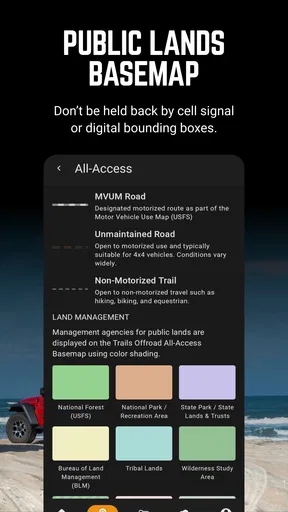
Trails Offroad: Offline Maps is designed for off-road enthusiasts who need reliable navigation in remote areas. The app provides detailed trail maps, difficulty ratings, and waypoints for various off-road adventures. Its offline capabilities ensure that users can access maps and guides even without a mobile signal, making it ideal for wilderness exploration.
How do offline maps work in Trails Offroad?
The app allows users to download maps and trail guides in advance, which can then be accessed without an internet connection. This feature is particularly useful in remote areas where network coverage is sparse. Users can navigate trails, view detailed maps, and track their progress, all offline, enhancing their off-road experience.
What kind of trails are included in the app?
Trails Offroad includes a wide variety of trails, ranging from easy scenic routes to challenging tracks for experienced off-roaders. Each trail is accompanied by a detailed description, difficulty rating, distance, and estimated time to complete, helping users choose routes that best match their skill level and vehicle capabilities.
Is Trails Offroad compatible with all devices?
Trails Offroad is available for both Android and iOS devices. The app is optimized for smartphones and tablets, providing a seamless user experience across different screen sizes. Users should ensure their devices meet the minimum operating system requirements for optimal performance.
Are there any subscription fees associated with Trails Offroad?
Trails Offroad offers a variety of subscription plans, including a free version with basic features and premium options that unlock additional trails and features. Subscription fees support ongoing updates and the addition of new trails. Users can choose a plan based on their needs and budget.


